The E1, 75 Ohms, 16 Port High Impedance Monitoring
Patch Panel is primarily designed for applications where E1 circuits
are required to be "patched" as well as simultaneously "tapped" for
non-intrusive monitoring applications.
The E1, 75 Ohms, 16 Port High Impedance Monitoring
Patch Panel is primarily designed to patch up to 16, E1 circuits. It
also, simultaneously, provides up to 16 high-impedance (Hi-Z)
outputs on it's monitoring (MON) port(s) from which, both the
transmit (Tx) and the receive (Rx) signals of the patched E1 link
can be "tapped non-intrusively" (i.e without disturbing or loading
the active E1 link(s) in any manner, and connected to E1 Groomers,
Probes or Analysers.
E1 - 75 Ohms Patch-Panel is used for E1 Patching
and Monitoring Application.
75 Ohms Patch Panel with Hi-Z Monitoring Port is
used for E1 Monitoring Application.
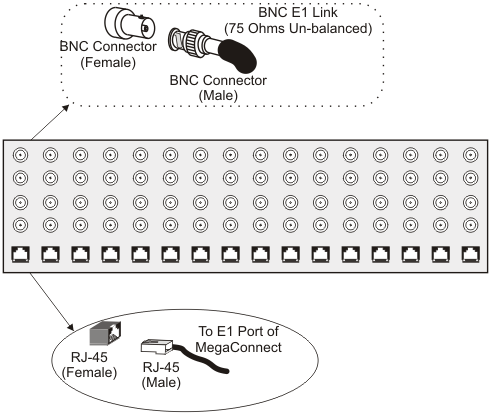
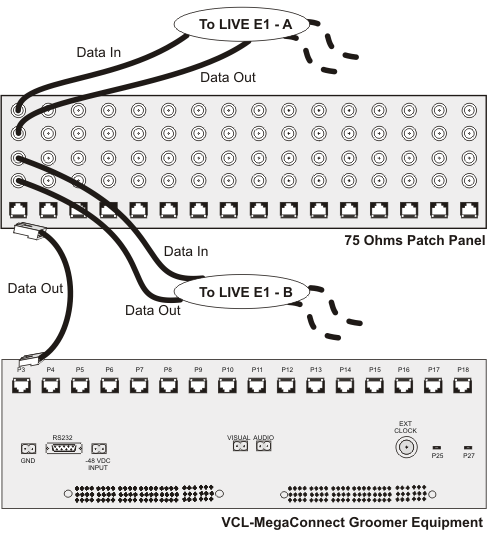
The BNC Connector is used for Data IN/Data OUT
from the 75 Ohms E1 links which are required to be monitored.
Data IN of Patch-Panel (BNC) will be connected to
Transmit/Data OUT of E1 Port.
Data OUT of Patch-Panel (BNC) will be connected to Receive/Data IN
of E1 Port.